Upgrade Your Odoo System With Confidence
Move your Odoo environment to a newer version or modernize an existing setup with a structured approach to data, customizations, workflows, integrations, and testing.
We focus on making the transition practical and controlled while keeping the business ready to operate on the upgraded environment.
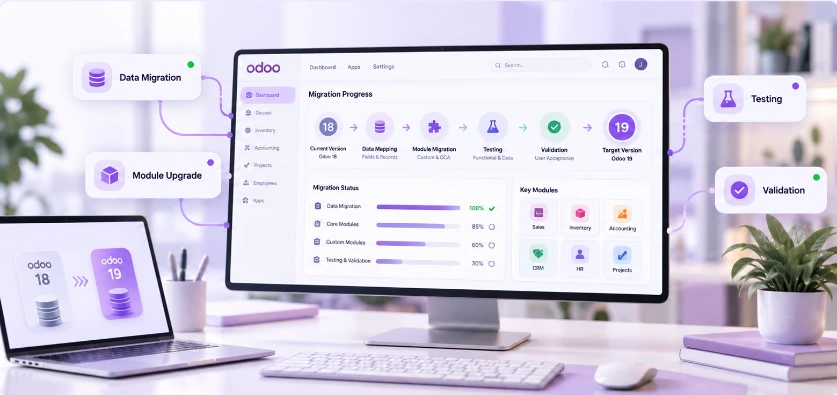
Upgrading Odoo Is More Than Moving Data
Upgrading an enterprise Odoo system involves far more than transferring database records. Over time, businesses accumulate custom modules, modified workflows, critical reports, specific access permissions, and third-party integrations.
A successful upgrade requires evaluating what the business actually needs to carry forward, identifying obsolete code that can be retired, modernizing essential customizations, and ensuring historical transaction integrity.
By taking a structured approach to validation and testing, we protect operational continuity so your teams can transition seamlessly to the latest platform.
Migration Transition Roadmap
A Complete Approach to Odoo Migration & Upgrade
Comprehensive technical execution designed to safeguard your data, code, and operational continuity.
Migration Assessment
Review the current Odoo environment, version, modules, customizations, data, and integrations.
Upgrade Planning
Define the migration approach, scope, dependencies, risks, and expected business impact.
Data Migration
Move required business data while considering data structure, consistency, and validation.
Customization Review
Review existing custom modules and customizations to determine what needs to be adapted for the target Odoo version.
Integration Validation
Review connected systems and verify that integrations continue to work correctly after migration.
Testing & Go-Live Support
Test critical workflows, identify issues, support final validation, and assist during the transition.
A Structured Odoo Migration Process
A controlled migration starts with understanding the existing environment before deciding what should move, change, or be improved.
Assess
Review the existing Odoo version, modules, customizations, data, integrations, users, and business-critical workflows.
Plan
Define the target environment, migration scope, dependencies, risks, testing strategy, and go-live approach.
Migrate
Move the required data and adapt the necessary customizations, modules, workflows, and integrations.
Validate
Test critical business scenarios, reports, access rights, integrations, and operational processes.
Go Live & Support
Move to the upgraded environment, support users, resolve issues, and stabilize the system after go-live.
Before Upgrading, Understand What You Already Have
A successful migration depends on understanding the current environment before making changes to it.
Version & Environment
Odoo version, hosting infrastructure, database volume, and technical server environment.
Installed Modules
Installed core apps, community add-ons, third-party apps, and inter-module dependencies.
Custom Modules & Code
Bespoke Python modules, custom views, XML overrides, and tailored business calculations.
Business Data & Records
Customer histories, accounting ledgers, open orders, stock inventory, and transaction logs.
External Integrations
Payment gateways, eCommerce stores, 3PL logistics APIs, and third-party software connections.
Workflows & Reports
Critical approval routes, automated email triggers, user security groups, and executive reports.
When Businesses Consider an Odoo Migration or Upgrade
Typical situations where our migration and upgrade services provide structured execution:
Moving to a Newer Odoo Version
Upgrade an existing environment to take advantage of newer capabilities and a more current platform.
Replacing an Outdated Setup
Modernize an older implementation that no longer supports current business requirements.
Moving From Another Environment
Migrate an existing Odoo implementation into a new, optimized, or re-architected environment.
Cleaning Up an Implementation
Review outdated customizations, modules, workflows, and data before moving forward.
Modernizing Customizations
Adapt existing custom functionality to work effectively with the target environment.
Preparing for Business Growth
Create a stronger technical foundation for new users, processes, locations, integrations, and business requirements.
Migration With the Business in Mind
Business Continuity Focus
We consider the workflows and operations that need to continue working throughout the transition.
Practical Migration Decisions
We help determine what should be migrated, adapted, replaced, or retired.
Customization Awareness
We consider the impact of custom modules and existing modifications instead of treating the system as standard Odoo.
Post-Migration Support
We can continue supporting the upgraded environment after go-live and help resolve issues or improve the system.
Built for Businesses Ready to Modernize Their Odoo Environment
Tailored for organizations planning an upgrade or modernizing their existing ERP foundation:
Running an Older Odoo Version
Organizations using older Odoo releases needing access to modern features, speed, and platform security.
Planning a Version Upgrade
Companies preparing a structured upgrade path while safeguarding historical transactions and ledger data.
Reviewing Existing Customizations
Businesses with legacy custom modules that require code refactoring and modernization for the target release.
Carrying Integrations Forward
Systems connected to payment, eCommerce, and logistics APIs that must remain functional during transition.
Modernizing Setup & Performance
Existing implementations suffering from database bloat, outdated logic, or sluggish response times.
Evolving Business Requirements
Organizations whose business models have grown significantly since the original ERP deployment.
Ready to Move Your Odoo Environment Forward?
Tell us about your current Odoo version, environment, customizations, and what you want to achieve. We'll help you determine a practical migration or upgrade approach.